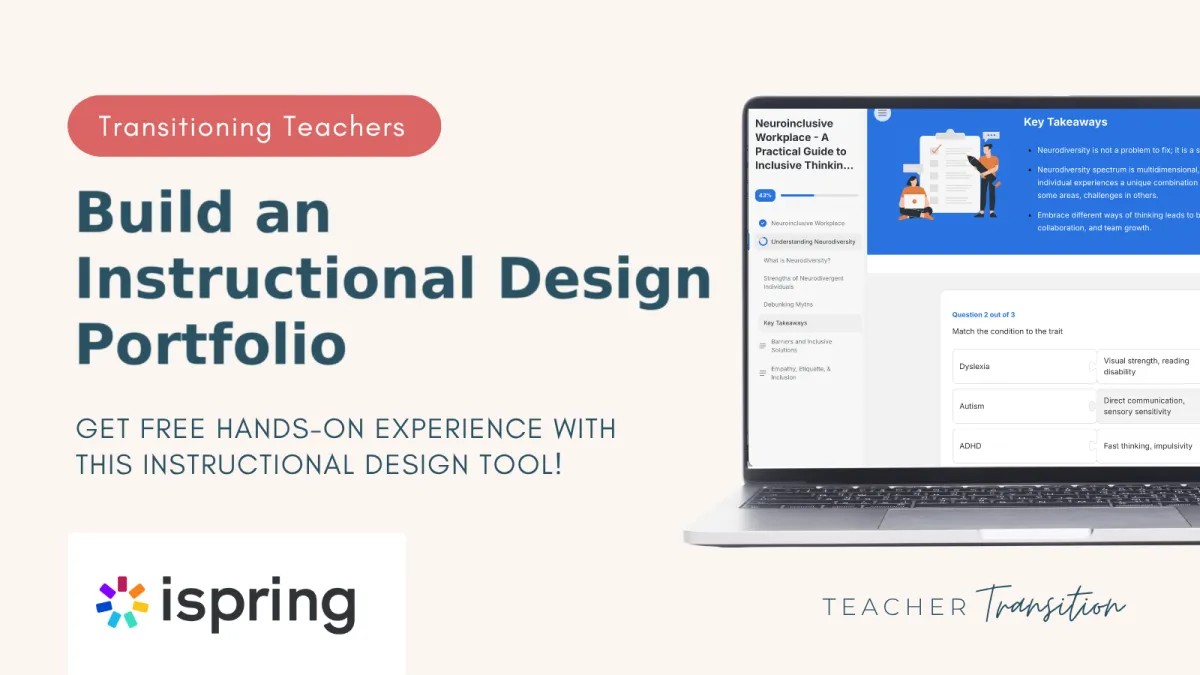
Instructional Design Portfolio with iSpring | Teacher Transition
How to Build a Curriculum & Instructional Design Portfolio with iSpring (Even If You're Still Teaching)
You have designed hundreds of lessons. You've written assessments, scaffolded units, differentiated for over thirty different brains in one room at a time, and rebuilt a whole week of plans the night before because something wasn't landing.
So why does every "Instructional Designer" job posting make you feel like you're not qualified?
Here's the truth we tell every teacher who walks through our door: the gap between you and a learning-design role usually isn't skill. You already do instructional design — you just call it "Tuesday." The gap is proof. Hiring managers can't see your classroom, and "I taught for ten years" doesn't show them what you can build for their company.
That's exactly the gap a portfolio closes. And it's why we're so excited to introduce you to iSpring — an eLearning authoring tool that lets you turn the skills you already have into polished, shareable proof. You can start for free today, no extra degree, no starting over.
Let's walk through it together.
Key Article Takeaways Key Article Takeaways
You're not starting over — designing learning is instructional design, and teachers already do it every day.
An instructional design portfolio is the single most important thing for proving your skills to hiring teams who can't see your classroom.
iSpring is an online course creation tool that makes it easy for you to create eLearning resources, like those used at large companies
By creating a corporate-style course with their easy-to-use tool, you will have a great portfolio piece that will help you stand out as an applicant.
You can try iSpring free for 14 days with no credit card — long enough to build your first real portfolio piece.
What is iSpring, and how can it support a transitioning teacher?
iSpring is an eLearning authoring tool that helps you create interactive online courses with quizzes, scenarios, videos, and other engaging learning activities. Its intuitive design makes it easy to learn and use, allowing you to focus on creating effective learning experiences rather than mastering complex software.
iSpring Solutions has been building eLearning tools for over twenty years, and as you start your free account, you’ll see how easy they have made it for you to create online learning resources. For a teacher, the appeal is simple: it takes the thing you're already good at — designing how people learn — and packages it the way hiring teams at education companies and beyond expect to see it. This helps you stand out to them as an applicant!
Want to see what that actually looks like? Take two minutes to explore a finished course built entirely in iSpring. That's the kind of polished sample you could add to your own portfolio within a couple of weeks — and it started with the same free trial you're about to begin.
Why a curriculum and instructional design portfolio is the thing that actually gets you hired
Your portfolio is a small set of sample courses, quizzes, and learning experiences you've built to show a hiring team what you can actually do. It matters because most curriculum & instructional design and L&D roles hire on demonstrated ability, not credentials — they want to see a course you made, not just read that you taught an effective math unit.
If you're still teaching and just exploring what else is beyond the classroom, a portfolio is how you test-drive the work before you ever hand in a resignation letter. And if you're already out of the classroom and stuck at the entry level, a strong portfolio can open new job opportunities for you
You don't need ten samples. Two or three sharp pieces that show your learning design skills will do more than a resume full of adjectives. (If you're still identifying which roles your portfolio should help you land, our guide to alternative careers for teachers is a good next read.)
What hiring managers want to see in a portfolio
A strong starter portfolio will include an e-learning resource with the following:
One short course sample — a single topic, taught well, start to finish.
One interactive assessment — a quiz or knowledge check that gives feedback, not just a score.
One scenario or simulation — a "what would you do?" branching moment that shows you can design for decision-making (think PBL experiences).
Clean, professional output — something that opens in a browser and looks like it belongs at a real company.
Every one of those is something iSpring helps you build.
Your teaching skills already transfer to curriculum and instructional design roles
Here's the reframe we want you to sit with: you are not learning a new profession from scratch. You are transferring your skills. You are relabeling and repackaging work you already do.
Look at how directly it maps:
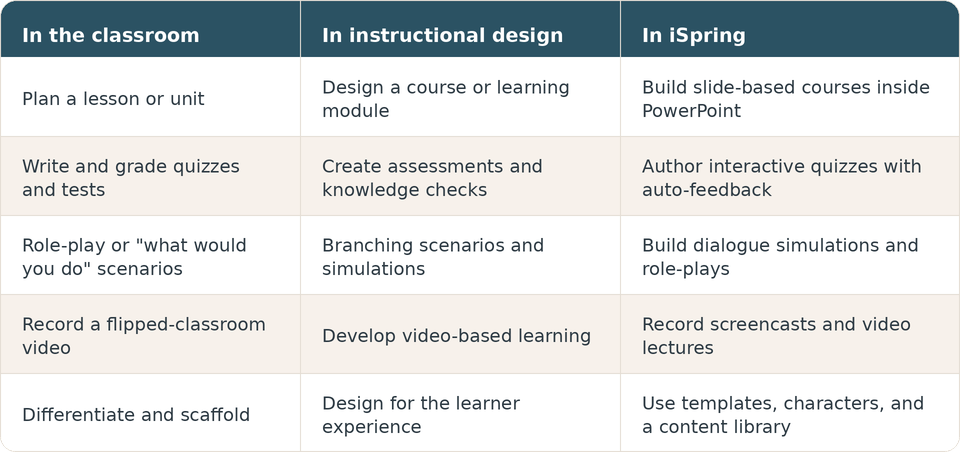
Notice how every skill listed here is one that you already have. That's the whole point — your influence doesn't end at the classroom door, it just needs a new way to reach learners for good. iSpring is the tool that lets a hiring manager see your skills beautifully displayed in an elearning format they want their new hire to know. iSpring sets your skills free, removes the “walls” of your classroom, and gives you the ability to create learning materials and resources that can influence anyone, anywhere, anytime in a new e-learning format.
How to build your first portfolio piece this week
You will have a real sample built before your trial ends. Here's a simple path:
Start your free iSpring trial. Fourteen days, full access, no credit card. (Link is at the bottom — start there.)
Pick one small topic you know cold. A single lesson you've taught a hundred times is perfect. Familiar topic = faster build.
Build a short course from a few slides. If you've ever made a slide deck, you're already most of the way there.
Add one interactive quiz. Write a few questions, insert what the feedback would be for each response, and done. This is one piece hiring teams love to click through.
Add one scenario if you have time — a quick scenario like "a customer says X, what do you do?" shows additional capability.
Publish and save the link. That link is a portfolio piece. Drop it on your LinkedIn, your resume, your portfolio page.
If you want to build your iSpring project alongside other teachers doing the same thing? That's exactly the kind of support, collaboration, and connection you'll find inside our membership community. And since the iSpring trial is free, nothing is stopping you from getting started today.
Bonus: See the other side of the screen with iSpring LMS
Once you've built a course, it has to live somewhere — that "somewhere" is a Learning Management System (LMS), where companies deliver training and track who completed it. iSpring makes one too, called iSpring LMS.
You don't need it to build a portfolio. But knowing that the e-learning you create can live in an LMS helps you speak the language of L&D teams in interviews. In the LMS, your courses get assigned, completed, and reported on in the real world, and that context alone can set you apart from candidates who only know the classroom side of the screen.
Start building your proof... Free
As a teacher, you already design learning. You already write assessments. You already create experiences that change how people understand the world — you've just been doing it in a classroom instead of a company. The only thing standing between you and a learning-design role is proof that a hiring team can click on.
iSpring lets you build that proof inside tools you already know, for free, this week. Whether you're a teacher like Whitney quietly exploring what's next as a classroom teacher or Taylor ready to level up out of an entry-level role, a single afternoon and a free trial can turn "I think my skills transfer" into "here, let me show you."
You are not starting over. You're building on a powerful foundation — and now you've got the tool to show it.
👉 Start your free 14-day iSpring trial (no credit card required)
Not sure which path is the best fit for your skills? Take our free quiz, and we'll help you find the role that fits you best. You don't have to figure this out alone.
FAQ
Do I need instructional design experience to use iSpring?
No. iSpring is built so that people with no experience can create professional courses, and it works inside PowerPoint — software most teachers already use daily. If you can build a slide deck and write a quiz, you can build your first course. Your teaching experience is your design experience.
Is iSpring really free to try?
Yes. iSpring offers a 14-day free trial with full access and no credit card required, so you can build a real portfolio piece before deciding anything. After the trial, you'll have a link to a completed portfolio that clearly shows your skills.
Do I need to know how to code?
Not at all. iSpring is built for non-technical creators. It handles the technical output — the industry-standard course files companies expect — automatically in the background, so you can focus entirely on the teaching and design you're already good at.
Does iSpring work on a Mac?
The main iSpring Suite is a PowerPoint add-in for Windows. If you're on a Mac, use iSpring Cloud AI, the browser-based version that needs no Windows install. Either way, you can build and publish portfolio-ready courses.
Can I build an iSpring portfolio while I'm still teaching?
Absolutely — and many teachers do. You can build samples in the evenings or over a weekend using topics you already know, then publish them as shareable links. It's a low-risk way to test the work and start your portfolio comfortably while still teaching.
